How to Install and Activate an Airalo eSIM for Travel on iPhone and Android
11/4/2026 4:45:52 AM
Airalo sells data plans on an eSIM that you install on your phone before you travel or when you arrive. This guide covers installing on iPhone and Android and when your plan's validity starts, based on Airalo's official Help Center.
In short
Before installing: an eSIM-compatible, network-unlocked device and a stable connection, preferably Wi-Fi.
Direct install in the app: My eSIMs, View details, Install or share, then Start installation.
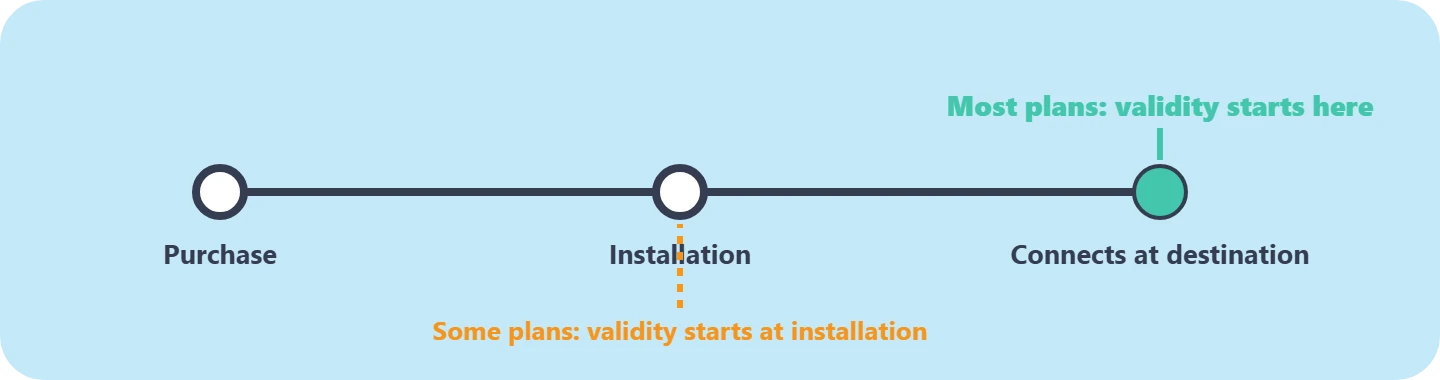
For most plans, validity starts when the eSIM connects to a network at your destination; for some, at installation.
Hasilh codes: YY15 for new customers, YY10 for existing customers.
15% off Airalo eSIMs for new customers
On your first Airalo order, valid until December 31, 2026
✓Make sure your device is eSIM compatible and network unlocked.
✓Use a stable connection, preferably Wi-Fi, since the eSIM downloads to your device during installation.
✓Check the plan's activation policy before or after purchase under Package details, so you know when validity starts.
When does the plan's validity start?
When an Airalo plan's validity starts, per the Help Center
Airalo says your plan lasts for the stated validity period as long as you don't use all the data first, and that validity starts when the eSIM activates. Most eSIMs activate when they connect to the supported network at the destination, so installing early usually won't cost you plan days. Some eSIMs can activate at installation wherever you are; you can check this before purchase under Additional Information, then Activation Policy.
Direct install from the Airalo app
The install path in the Airalo app
1Open the Airalo app
Go to My eSIMs and select your eSIM.
2View details
Then scroll to Ready to use your eSIM?
3Install or share
Choose Start installation to install directly, or Share and more for the QR code and manual instructions.
4Wait for activation
Allow the eSIM to activate if asked and don't exit; it may take a few minutes. Then select Done.
After installing, a pop-up may ask you to enable data roaming for the eSIM if required, then whether you've reached your destination. If you have, tap Get Connected for the connection steps; if not, tap Connect Later.
Airalo says only some Android models support direct installation from the app. If a direct install fails with "Something went wrong", tap View options for automated replacement, automated refund or escalation to support, depending on the situation.
Manual or QR code installation
Start in
iPhone: Settings, then Cellular (or Mobile Data)
Android: Settings, then Network & Internet
Add the eSIM
iPhone: Add eSIM (or Add Cellular Plan)
Android: + Add Mobile Network (or Add eSIM)
Scan or enter
iPhone: Use QR code, then Scan QR Code, or Enter Details Manually
Android: Scan the QR code and enter the confirmation code if prompted
Manual details
iPhone: SM-DP+ Address, Activation Code, and Confirmation Code if provided
Android: As your device shows
The manual details and QR code are in the app under Share and more, and in the installation PDF attached to your order confirmation email. Android menu names vary by manufacturer.
Airalo codes on Hasilh
YY15
Discount: 15%
Condition: New customers, first order, until December 31, 2026
YY10
Discount: 10%
Condition: Existing customers, until December 31, 2027
AIRALOESIM10
Discount: 10%
Condition: Unlimited data eSIMs, until December 31, 2026
FAQ
Should I install the eSIM before I travel?
For most plans you can, since validity starts when it connects to a network at your destination, but check the Activation Policy first because some plans start at installation.
When does an Airalo plan expire?
At the end of the stated validity period, or when you use up all the data before then.
Why did the installation instructions disappear from the app?
Once the app detects the eSIM is installed, it shows a How to connect section instead; the instructions are also in the PDF attached to your order email.
What if the installation fails?
From the "Something went wrong" message, tap View options for automated replacement, refund or support.
We checked Airalo's Help Center on November 4, 2026. Plans and activation policies are set by Airalo and may change. Hasilh may earn a commission on purchases through these links at no extra cost to you.


 Emirates
 Kuwait
 Egypt
 Qatar
 Oman
 Bahrain
 global